01
A smaller target to generate
A canonical grammar, versioned profile and structured diagnostics give the agent a focused generate–check–repair loop.
GENERATE → CHECK → REPAIRA compact DSL for agents to compose tools, data and native interfaces. Built on Makepad Splash, with a bounded workflow runtime and an inspectable path from pixels to components.
Open source · Rust host · Makepad Splash VM
use mod.tool

let task = "prepare release notes"
let result = tool.call("text.echo", task)
result
"prepare release notes"An LLM needs a language it can generate, check and repair. An application needs to know exactly what that program can do. Octoscript makes both sides explicit.
A canonical grammar, versioned profile and structured diagnostics give the agent a focused generate–check–repair loop.
GENERATE → CHECK → REPAIRRegistered tools, data contracts and per-step grants define available effects. Valid source cannot authorize itself.
REVIEW → GRANT → EXECUTEA shared Rust VM, explicit resource limits and host-pumped deferred work fit application lifecycles and UI event loops.
COMPACT → BOUNDED → EMBEDDABLEGeneral-purpose languages excel at ecosystem access. Octoscript chooses a smaller execution contract for generated programs embedded in an application: the model expresses work, and the host can inspect and control each step.
| Design question | Python / JavaScript | Octoscript |
|---|---|---|
| Generation target | General-purpose syntax and ecosystems; the app defines its accepted surface. | Canonical grammar + profile + tool catalog. |
| Authority | Determined by embedding, isolation and exposed APIs. | No tool authority by default; host-issued grants. |
| Execution budget | Limits and app integration depend on the selected runtime. | Explicit instruction, time and memory bounds; host-driven yield and resume. |
Compactness and efficiency are design goals. Safety and reliability come from checks, grants, budgets and host isolation—not an unmeasured performance claim.
Read the motivation and execution modelSplash brings a Rust VM, composable objects and a live UI language. Octoscript adds a bounded workflow contract and capability-controlled execution. VM hardening lives in the shared Makepad fork; UI composition continues to reuse Splash.
Why fork, and what stays shared?Shared implementation · host-specific bindings and VM instances
Meet Splash from Rik Arends and the Makepad project: a live-editable UI language and the VM foundation of Octoscript.
View {
    width: Fill
    height: Fit
    flow: Down
    spacing: 12

    title := Label {
        text: "Ready to build"
    }
    launch := Button {
        text: "Run workflow"
    }
}UI excerpt: requires a host with Label, Button and other widget bindings.
Type { … } instantiates definitions; name := identifies children. UI remains reusable and addressable.
+: merges inherited properties. Themes and kits share defaults across component instances.
Functions and callbacks describe interaction; Rust registers components, owns state and implements services.
Shaders, instance values, uniforms and Animator support custom GPU visuals and state transitions.
A UI host can reload or update Splash, then inspect widgets and rendered frames to guide repairs.
Author Splash directly, or realize an L0 / L1 card tree, lower it through a kit, then evaluate renderer UiNodes and emit widget source. Sharing makepad-script does not share host permissions.
UI generation has its own contract: declarative L0 and a bounded L1 arithmetic extension. Below, distinguish these capabilities from the four implementation layers.
Components, data bindings, keyed collections, state, and event transitions. Realize the node tree without a VM.
Everything in L0, with bounded pure arithmetic expressions for values that the interface needs to derive.
These four layers describe how a card becomes an operable UI. They are separate from the language capabilities declared in card headers above.
Card + host data → UI treeValidate origins, state, keys and traversal budgets.
UI tree + kit → component callsPreserve roles, parameters, themes and source IDs.
Calls → UiNode → SplashEvaluate source into UiNode; Rust emits widget descriptions.
Widgets → pixels + eventsReal layout, rendering, input and state feedback.
Capability status: UI L0 is implemented; UI L1 admits bounded pure arithmetic only. UI L2 is unimplemented and rejected before parsing. No UI L3 capability profile exists. Pipeline layer L3 confers no execution authority.
Syntax, complete examples and level checking →Makepad-drawn widgets and platform controls are both UI targets. A host can compose them in one page while keeping language, logic and rendering responsibilities clear.
Rust + GPU backends share layout, drawing, components and interaction across native and WASM.
Rust-evaluated tree → JNI → Java builder → Android / Material views.
Rust → ArkUI C API → native nodes; shell and specific platform handoffs remain in ArkTS.
Makepad has an iOS backend and native-view hooks; a complete UIKit tree requires a dedicated adapter.
The host coordinates rectangles, clipping, layering, focus, keyboard and lifecycle. A native preview can carry camera frames, Makepad can draw custom overlays, and platform controls can supply system input.
In the recorded development branch, camera/native and camera/oh depend on octosense-camera-logic. This is not the current Camera bundle architecture. They share the state machine and scene generation, rendering through Makepad kits or ArkUI C API nodes.
Inspect the shared logic and hostsMakepad widgets and platform system controls are different backends. Same-page composition needs host adapters; arbitrary shaders do not become system controls automatically.
Read the platform mapping and composition detailsFrom Studio for human developers to inspection and control primitives inside the app, reachable over a socket. An agent can understand and drive the running UI without operating an IDE window.
Read widget IDs, types, text, state and current rectangles.
/snap?q=ButtonClick, drag, scroll, press keys and type using fresh bounds.
/click · /m · /k · /tWait for a real frame; inspect app pixels and behavior logs.
/g · /gseq · /logInspect reflected properties, try an edit, then persist it in source.
/tweak/state · /tweak/applyInstrumentation is enabled explicitly for development. Headless means no Studio GUI is needed; visual checks still use the real GPU, with inspection and capture support determined by each host.
These instruments serve a coding agent. Runtime app agents are managed by OctoSense and octos, with permitted account workspaces, tools and conversation routes. Standalone card-host registers no agent services.
Explore the interactive app and agent architectureRead how language, instruments and A2App fit togetherTwo flows preserve the link from visual source to runtime, letting an agent move into code and back to real widgets and interactions for verification.
Design related screens together, then connect their visuals, data and actions into a working service experience.
Preserve the prompt, atlas, scene crops and coordinate transforms.
Map text, controls, numerical charts and artwork to appropriate components.
Extract service cards and connect reducers, state, grants and actions.
Inspect widgets and real frames, then export native or WASM packages.
Select a source element to inspect its native component type and service event.
The source button becomes a KitButton with separate control and label children; the installation service handles its action.
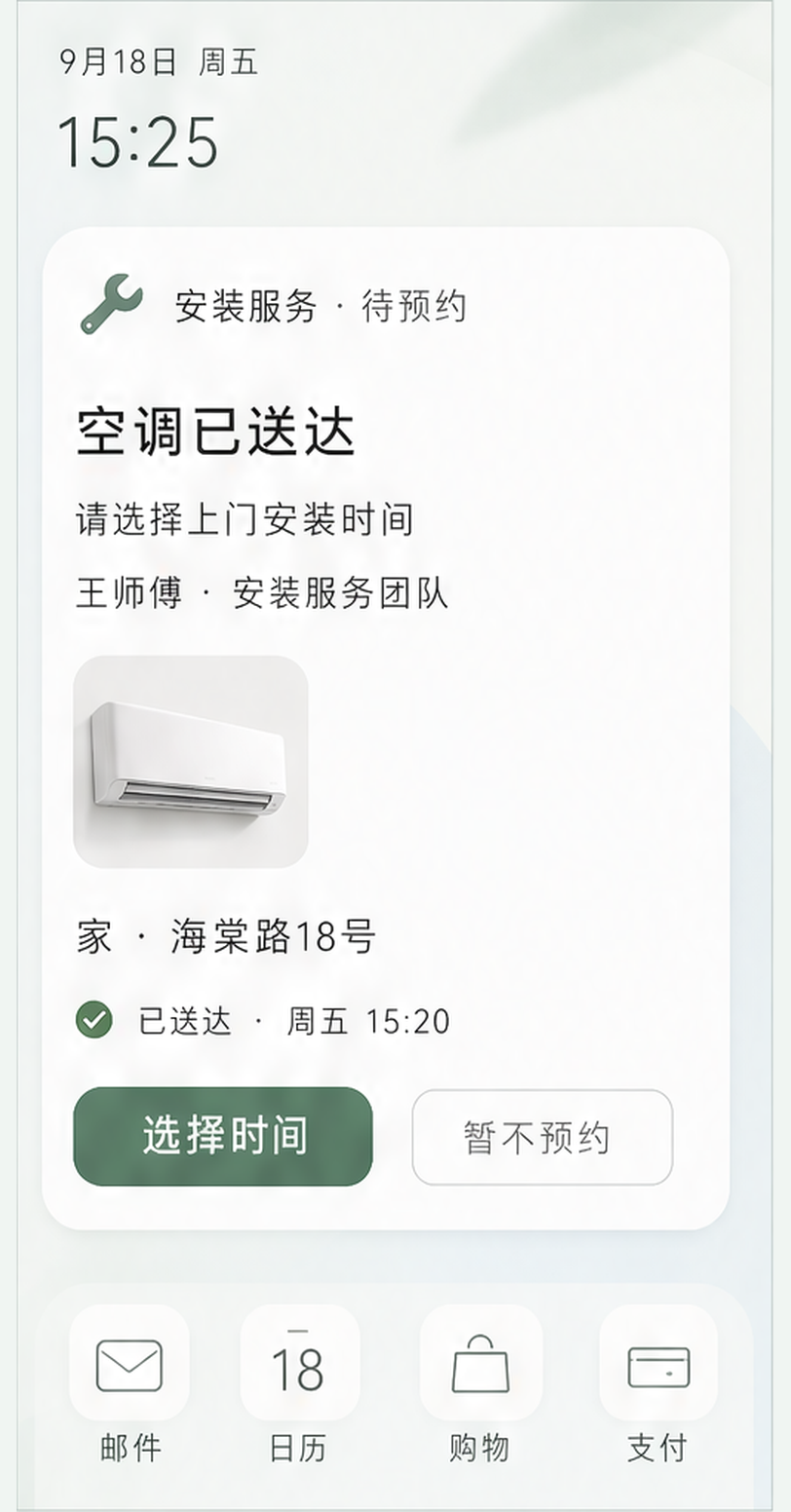
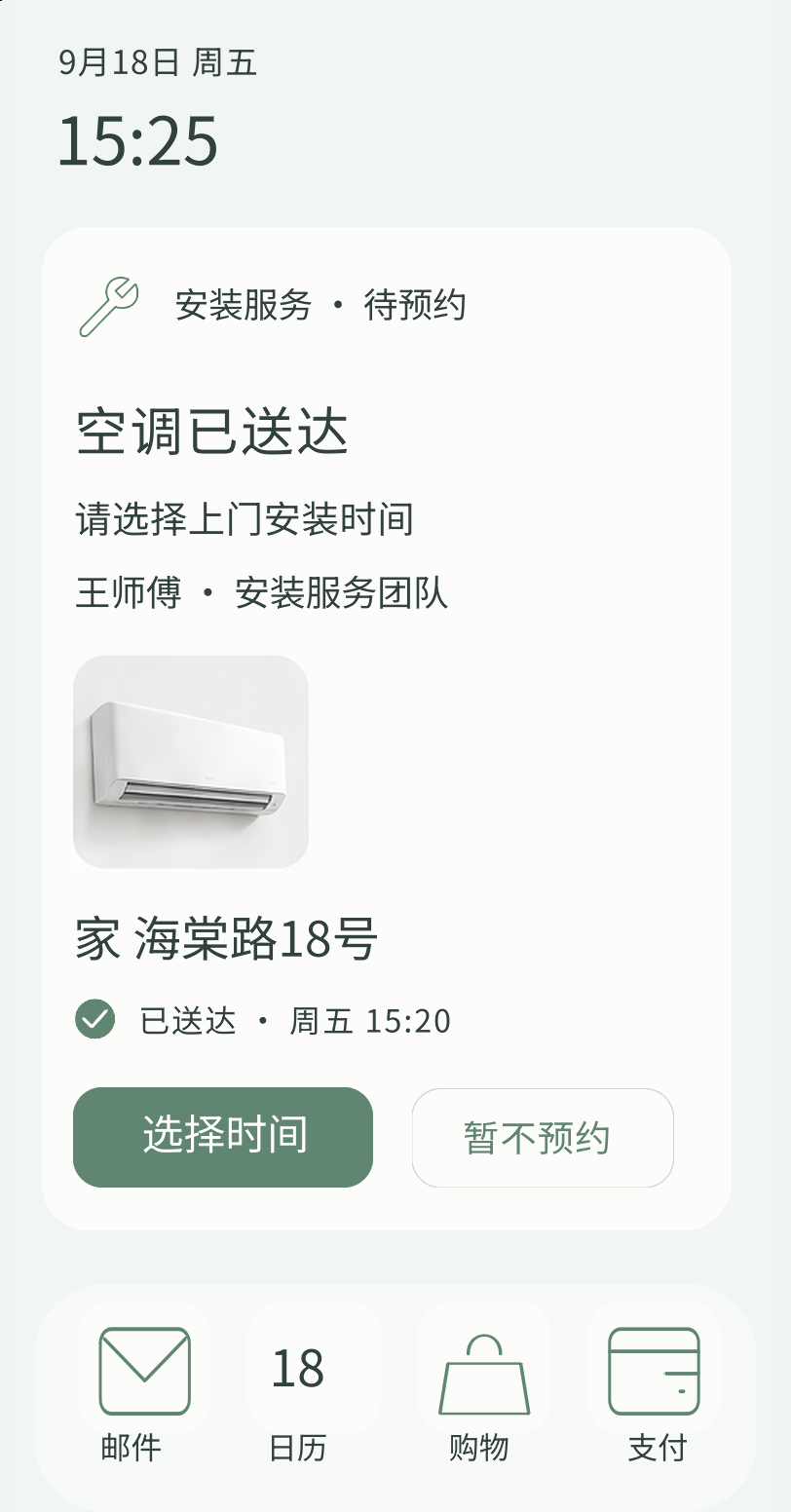
Archived source and native render; highlights locate mapped source regions. This iteration retains typography, icon and shadow differences. The inspector shows recorded mappings; it does not call an installation service.
Use document hierarchy, symbols and source IDs to turn a design family into reusable native components.
Parse artboards, groups, fonts, masks and stable source IDs.
Keep text as labels, controls interactive and artwork traceable.
Verify trees, layout, real input and native frames.
Extract shared definitions, tokens and bindings for new pages.
A Camo music row retains its cover Image, title Label and play control, then becomes a shared CamoTrackRow. Instance parameters supply content and state while preserving source IDs.
The initial import preserves a fixed artboard; responsive layout and application behavior still need authoring. Quantitative charts use numerical widgets and explicit data, rather than painted curves.
CamoTrackRow
├─ Image       cover
├─ Label       title
├─ Label       artist
└─ control     play

KitButton  ·  KitFormField
KitTabBar · TaskplanProjectCardExplore Material components and Flutter example designs, drawn by the real Makepad renderer.
Start the lab to interact here.
MATERIAL 3 · FLUTTER DESIGNSRequires WebAssembly and WebGL. The component catalog and instructions remain readable HTML; canvas accessibility differs from HTML forms. Full catalog and support scope →
A workflow can run without a screen. When it needs a person, an App Card exposes the data, the context, and the next action.
Keep the original message attached to the proposed action.
Present structured data through native components.
Let a person confirm or dismiss the proposal.
The school email proposes a new time. Review the calendar change here.
Ms. Lin · Willow SchoolHello Alex, our school visit has moved to Friday, 18 September, at 3:30 pm. Please meet us in the school garden. — Ms. Lin
Your order is ready. Confirm a delivery window without opening a shopping app.
Haven Home · Delivery teamHello Alex, your refrigerator is ready for delivery on Saturday, 19 September, between 9 am and noon. Please confirm this delivery window. — Haven Home
Your stay offers an airport pickup. Keep this next step with the rest of your trip.
Coast Stay · Guest servicesHello Alex, we can arrange your airport pickup on Monday, 21 September, at 2 pm. The meeting point is Arrivals, Terminal 2. Please confirm. — Coast Stay
Interactive concept · sample data · no external actions
Check the source, register a local demonstration tool, and run. Then replace the demo tool with the services your application provides.
Clone the Octoscript repository.
The checker validates source before execution.
Register tools in your embedding host.
use mod.tool

let task = "prepare release notes"
let result = tool.call("text.echo", task)
result
git clone https://github.com/OctoSense-org/Octoscript.git
cd Octoscript

cargo run --locked -p octoscript-cli -- \
  check examples/tool_workflow.octoscript

cargo run --locked -p octoscript-cli -- \
run --allow-echo examples/tool_workflow.octoscriptStart with the architecture. Go deeper when you need to.
Explore an interactive map of native Rust, Splash and L0 apps, then follow agent requests, tools and data.
Motivation, Python / JavaScript tradeoffs, execution boundaries and Splash lineage.
Language features, reusable Rust, native UI hosts and in-app agent instruments.
Two detailed flows: generated image atlases and structured Sketch documents.
Workflow syntax, UI capability levels and the four implementation layers.
Browse roles and interact with real Material and Flutter design examples.
The workflow language, host responsibilities, and optional UI path.
Follow the handoff through component kits to Splash and native widgets.
How Octoscript uses the Makepad Splash VM and keeps its dependency aligned.